
A filing clerk for your patient forms
They fill it out on their phone. It’s downloaded, named, and filed.
Two years ago a client asked us if her forms could download themselves. This year she asked if they could file themselves too. FormRetriever does both, and the rest of the clerical work that starts when a patient hits submit. On a PC in your back office, it checks every fifteen minutes. Each PDF comes down, gets a proper file name, and lands in the right folder for the answer the patient gave, with the attachments alongside. Nobody had to go and get it.
Version 1.2.0 · Windows 10 & 11 (64-bit) · Included with Clinic Forms

Somebody still has to go get them
Digital forms fixed the clipboard. The finished PDF still sits on a website until a person signs in and fetches it.
It’s the office manager, usually, and usually first thing. Sign in to the forms site, open each submission, download it, rename it so anyone can find it later, work out which store it belongs to, drag it into that folder on the server. Twenty minutes on a quiet morning. On a busy one it waits until tomorrow, and when that person is out, nobody notices the pile for a week.
The forms are already in the folder. Each one sits in the subfolder for the answer the patient gave, under the name your staff expect, with the attachments alongside. Any that couldn’t be placed are waiting in a review folder, each with a note saying why, and the count is on the screen. The office manager opens the folder and starts working.
One question on the form does the filing
Your form already asks which location, which provider, or which service. Pick that question once and FormRetriever files by the answer. The list of answers comes across from the form itself, so there’s nothing to type and nothing to spell right.
Tick the forms you want
Every form on your account is listed by the name you gave it. Tick the ones worth collecting. The first check pulls everything already submitted, oldest first, so a form that's been live for a year doesn't start from today.
Pick the question that decides the folder
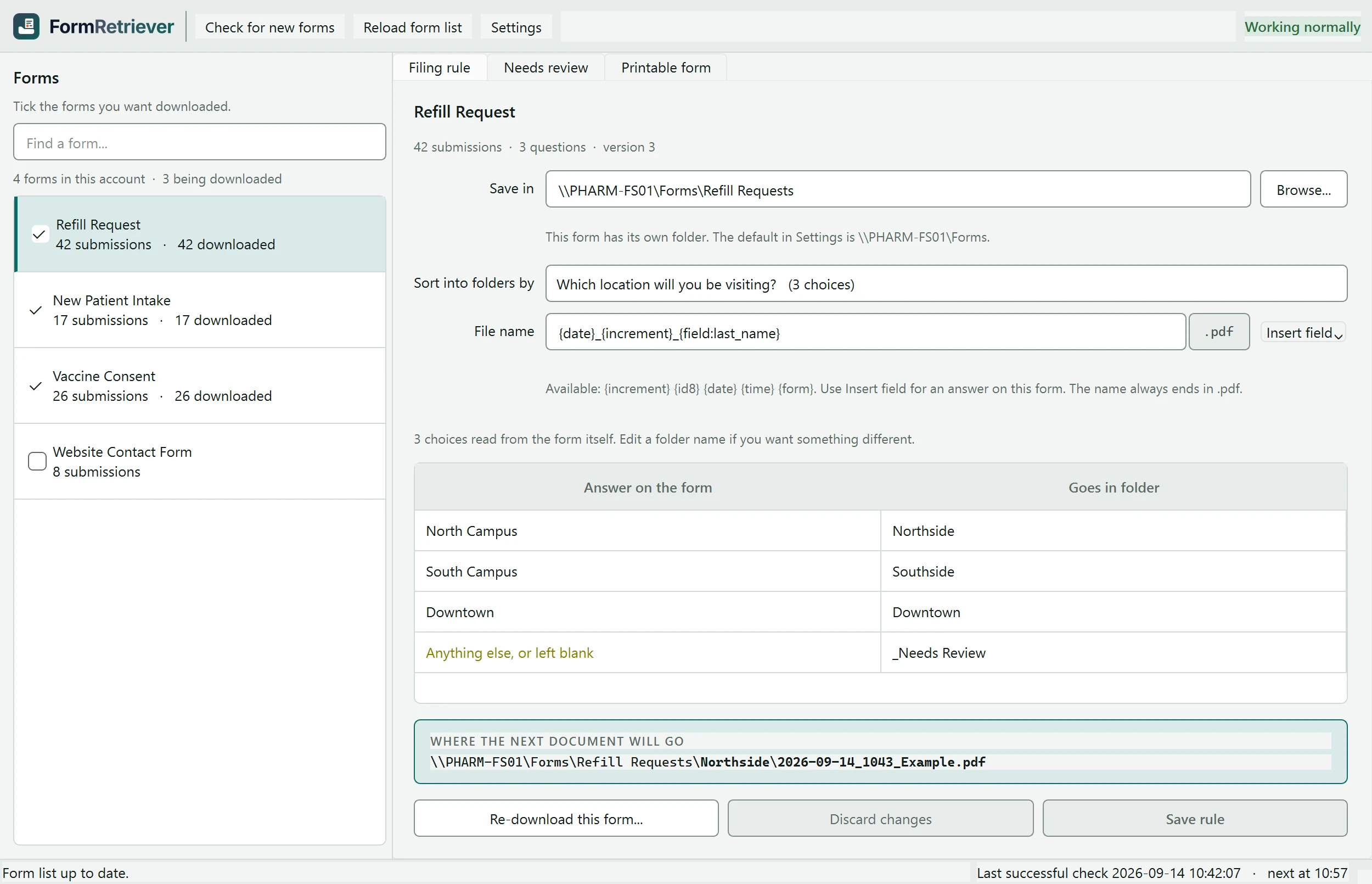
The picker shows the questions the way the patient reads them, and every answer gets a row in the folder table before you've typed a thing. Change a folder name if you want something different.
Name the files the way your staff expect
Date, submission number, last name, in whatever order you like. The editor won't let you save a pattern that could give two documents the same name.
Filing rule for the Refill Request form
- Save in
- \\PHARM-FS01\Forms\Refill Requests
- Sort into folders by
- “Which location will you be visiting?”
- Answer on the form, and the folder it goes in
- North Campus goes in NorthsideSouth Campus goes in SouthsideDowntown goes in DowntownAnything else, or left blank goes in _Needs Review
- File name
- 2026-09-14_1043_Whitfield.pdf
- Where the next document will go
- \\PHARM-FS01\Forms\Refill Requests\
Northside\ 2026-09-14_1043_Whitfield.pdf
The rest of the job
Filing is the point. These are the parts that let you leave the machine alone.
Attachments come along
The insurance card photo or the ID the patient uploaded is saved beside the form. That's a switch per form, on where you want attachments and off where you don't.
Any folder, any server
A folder on that PC or a share on your file server. Anything the PC can reach is fair game.
Every 15 minutes
That's the default. The setting goes anywhere from once a minute to once a day.
Lives in the tray
Close the window and the checks keep going. Right-click the icon to open the window, or to check for new forms right now.
Updates itself
A signed update installs at 3:30 in the morning, with nobody clicking anything.
We set it up
Managed clients get FormRetriever installed and configured as part of the service. Everyone else, setup is one screen, and we'll walk you through it on the phone.
Built so nobody has to babysit it
A back-office PC runs this all day with nobody watching. Here’s what happens when a form doesn’t line up with the rule, and how you know the checks are still happening.
When a form doesn’t fit the rule
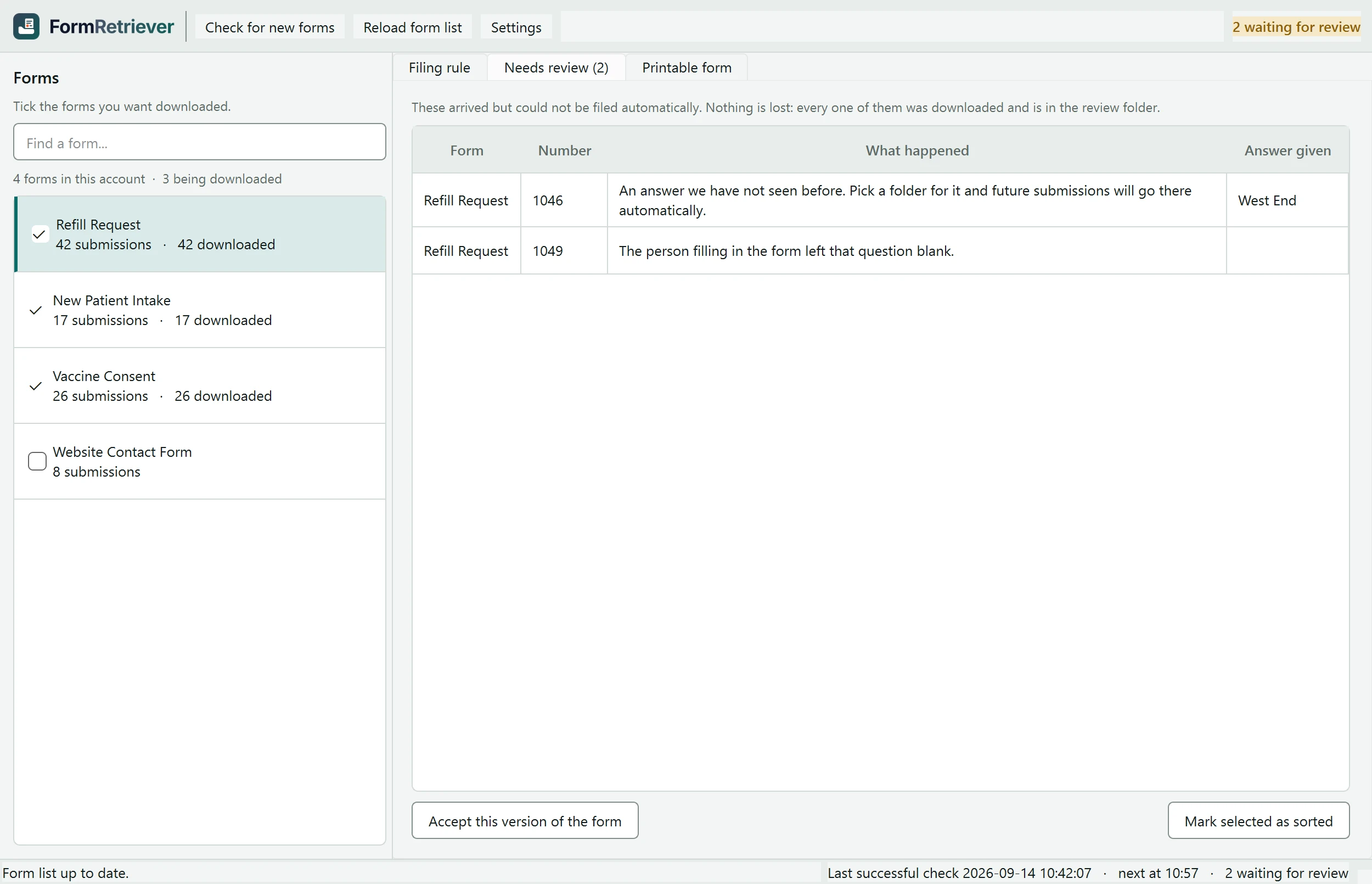
Some submissions won’t fit. A patient leaves the location question blank. A new location gets added to the form. Somebody edits the form after the rule was set up. Those PDFs still download. They go into a folder called _Needs Review, next to the others, each with a note in plain words saying what happened, and the count stays on the main window until somebody clears it. The notes are the app’s own, written for the person at the counter:
- A new answer shows up
- “An answer we have not seen before. Pick a folder for it and future submissions will go there automatically.”
- The question was left blank
- “The person filling in the form left that question blank.”
- Somebody edited the form
- “This form has been edited since the rule was set up. Check the rule still points at the right question.”
- The question is gone
- “The form no longer has the question this rule sorts by. Someone may have changed the form.”
- The answer can’t be a folder name
- “The answer could not be turned into a folder name.”
- The PDF came down wrong
- “The document did not download correctly.”
The review tab puts the same thing in one line: “Nothing is lost: every one of them was downloaded and is in the review folder.” Give a new answer a folder once, and every later one goes there on its own.
Nothing gets lost or written over
FormRetriever only reads from your HIPAAtizer account. Nothing there is edited, archived, or deleted, and no setting can change that. On your side, each PDF is written to a temporary file and moved into the folder only once complete, so nobody opens a half-downloaded document. Two documents never share a file name. If a name is already taken, the second one gets a different name.
You can see the checks are happening
The window and the tray icon show the last successful check, the next one, and how many documents are waiting for a person. A run history records every check and what came down. For managed clients, each successful check also touches a file our monitoring watches, so if FormRetriever ever stops, the alert comes to us.
FormRetriever for Windows
Version 1.2.0 · Windows 10 & 11 (64-bit)
Have us set it up
Included with Clinic Forms at $90 a site per month. No separate license to buy. See pricing.
The download opens here once the license agreement is posted. Until then we install it for you, which is how most offices want it anyway.
Need the installer yourself? Download FormRetriever v1.2.0.
Signed and published by Clinic Networking
The installer is code-signed, so the prompts list Clinic Networking, LLC as the publisher. Updates are signed the same way and checked before they install.
Runs on
- Windows 10 (64-bit)
- Windows 11 (64-bit)
- Nothing else to install first
Before it can collect anything
- Your forms on Clinic Forms
- Your account key, which we give you
- A folder to file into, on that PC or on your server
Pick a PC that stays signed in
Checks only run while someone is signed in to that computer, so a back-office workstation that never gets logged off is the usual answer, and anything submitted overnight is filed before the front opens. The icon lives in the notification area, not on the taskbar. If we manage your computers, we’ll pick the machine and handle the rest.
Questions we get asked
What does FormRetriever cost?
Nothing extra. FormRetriever comes with Clinic Forms at $90 a site per month, which is the plan your forms already run on: unlimited forms and submissions, e-signatures, and audit logging. There's no license for the software and no per-form charge.
Do we need Clinic Forms for this to work?
Yes. FormRetriever collects from a HIPAAtizer account, which is what Clinic Forms runs on. If your patient forms live somewhere else, this isn't the right tool, and we'll tell you that on the phone.
Where do the completed PDFs go?
Anywhere that PC can reach, including a share on your file server. You pick the top folder for each form, and the subfolder comes from the answer you chose to sort on. Attachments the patient uploaded can come down with the form or be left alone.
Can it grab the forms people already submitted?
Yes. The first check on a form collects everything already submitted, oldest first. A form that's been live for a year is caught up on the first run.
What happens if somebody edits one of our forms?
FormRetriever holds that form's new submissions in the review folder with a note asking you to check the rule, because a question can be replaced and keep the same name underneath. You look at the form, confirm the rule still points at the right question, accept the new version, and those documents file normally on the next check.
Does it send our data anywhere?
No. The only two things FormRetriever talks to are your HIPAAtizer account and our update server. The PDFs land where you point them, on your PC or your server. Nothing runs on our side, and we have no console into your forms.
Who installs it?
You can. Run the installer, paste in your account key, tick the forms you want, choose the folders. Most offices would still rather we did the setup, and for managed clients that's part of the service. Either way the key is yours and stays on your machine.
Will Windows warn us about the installer?
No. FormRetriever is code-signed, so you'll see Clinic Networking, LLC as the publisher. Updates are signed the same way and checked before they install.
HIPAAtizer collects the form.
Clinic Forms finishes the job.
Clinic Forms is HIPAAtizer with FormRetriever attached: the HIPAA-compliant forms and e-signatures, plus the clerk that downloads, names, and files every submission. Already on Clinic Forms? You have it. Call and we’ll set it up. Not yet? This is the reason to start. Either way you’re talking to the people in Oklahoma City who wrote it.
Already a client? support@clinicnetworking.com