
A refill line for independent pharmacies
Refill calls, answered around the clock
We built this as an extension of Clinic Voice, for the pharmacies we already look after: one-location stores where the refill line rings at the counter all day, and where the only other option was a chain-sized refill system at two to four times the price. So the price is $99 a month, flat. The line works with the phones you already have. Every prompt is yours to reword. And when a pharmacy asks for something it doesn’t do yet, that’s usually the next release.
$99/mo flat per location · No setup fee · No per-call charges · Month to month
Refill calls, start to finish
The line’s default script, word for word. Every line is yours to reword.
The call at 9:22 pm
-
The line says: Thank you for calling the prescription refill line.
-
The line says: To reach a pharmacy staff member, press 0 at any menu.
-
The line says: Para continuar en español, presione 9.
-
The line says: Please enter your prescription number.
- Caller presses: 4 8 2 9 1 7
-
The line says: You entered 482917. Press 1 if this is correct, or press 2 to enter a new number.
- Caller presses: 1
-
The line says: Your prescription was found. To refill this prescription, press 1.
- Caller presses: 1
-
The line says: For verification, please enter your date of birth as a two digit month, two digit day, and four digit year.
- Caller presses: 0 3 1 4 1 9 5 2
-
The line says: How would you like to receive your prescription? To pick up in store, press 1. For delivery, press 2. To speak with a pharmacy staff member, press 0.
- Caller presses: 1
-
The line says: Your refill has been submitted successfully.
-
The line says: Would you like to refill another prescription? Press 1 for yes, or press 2 to finish.
- Caller presses: 2
-
The line says: Here is a summary of the prescriptions submitted for refill during this call.
-
The line says: Prescription number 482917.
-
The line says: If you have any questions about these refills, press 0 to speak with a pharmacy staff member.
-
The line says: Thank you for calling. Goodbye.
Your refill queue
In LibertyRx, Computer-Rx, or PioneerRx
| Received | Rx | Request | Pickup |
|---|---|---|---|
| 9:22 pm | 482917 | Refill | In store |
| 7:41 am | 482260 | Refill | Delivery |
| 7:41 am | 390118 | Out of refills | Not asked |
| 7:41 am | 728406 | Refill | In store |
| 7:42 am | 351907 | Refill | Delivery |
| 7:42 am | 605913 | Refill | In store |
| 7:42 am | 517204 | Refill | Delivery |
Why pharmacies run it
Your counter stops answering refill calls
Day or night, weekends and holidays. Refill requests keep coming after you lock the door, and every one is waiting for your team in the morning.
Callers hear where their prescription stands
Ready for pickup, being prepared, on hold, out of refills. Each status has its own spoken answer, so the caller gets what they called for the first time.
Refills keep coming in when your Rx system can’t
If your pharmacy system is unreachable when a patient calls, the line still takes their prescription numbers and submits them once the connection is back.
We keep the minimum about your patients
Caller numbers are masked to the last four digits. Names, dates of birth, and medication names stay in your pharmacy system and never land in ours.
Off your staff’s plate in three steps
Every refill call the line handles is time your team gets back for the patients in the store.
Forward your refill number to us
Forward it to the line we assign you and it’s live the same day. Keep the phone system you already have, plain copper lines included.
The caller keys in the prescription number
The line reads the digits back and asks the caller to confirm, then checks who’s calling by the method you pick: date of birth, ZIP code, last four of the phone on file, or last name.
The refill lands in your pharmacy system
Submitted the way a technician would enter it, so your team works it in the software they already use. The caller hears that it went through once your system has accepted it.
More than “press 1 to refill”
Most refill lines take a number and hang up. This one answers the question the caller had, so the refill is handled on the first call. Your callers can:
- Refill several prescriptions on one call. The line offers another after each one, then reads back a summary of everything submitted before the call ends.
- Ask for a new prescription. When refills have run out or the script has expired, the caller can ask you to request one from the prescriber. On LibertyRx the request goes to the doctor through Liberty. On Computer-Rx and PioneerRx it lands with your team to send.
- Pick how they want it. In-store pickup, delivery, curbside, or mail. Callers only hear the options you offer, and if you offer one, they skip the question.
- Reach a person by pressing 0. From any menu, at any point in the call. The line says so at the start.
- Take the whole call in their language. Spanish, French, German, Portuguese, Japanese, Korean, Chinese, and Arabic are recorded and ready. One key, and every prompt in the call switches.
- Use a full phone menu. Any key can send a caller to refills, voicemail, your counter, a delivery line, or a message you recorded. Change an option and the spoken menu updates on its own.
- Skip verification when you recognize them. Optional. A call from the number on the prescription is waved through, and the line says so. Any other number gets the normal check.
- Leave a message instead. Voicemail is recorded, encrypted, and emailed to your team. After hours, a caller asking for a person hears you’re closed and is offered voicemail.
- Hear a clear answer. Ready for pickup, being prepared, on hold, transferred to another pharmacy, already submitted, too early. Each has its own message and its own next step.
Plugs into your pharmacy system
Refills post into the software your team already runs. Every integration we have exists because a customer asked for it.
LibertyRx
Direct cloud connection
Nothing to install at the store. Refills post into the Liberty queue that matches the pickup method the caller chose. Partial fills are handled correctly, so a 90-day prescription filled 30 days at a time still shows refills remaining.
Computer-Rx (WinRx)
RxConnector on a store PC
A small Windows app that installs on one store PC without admin rights and links WinRx to your refill line over an encrypted connection. Nothing to open on your firewall.
PioneerRx
RxConnector on a store PC
The same connector, pointed at Pioneer, with the same quick install. On Pioneer the line hands every active prescription to your team as a refill request instead of reading a refill count to the caller.
On a different system? Tell us which one and we’ll give you a straight answer.
Your Rx system goes down. Your refill line stays up.
Server reboots, an internet outage at the store, vendor maintenance at the worst possible hour. The refill line keeps answering. When it can’t reach your pharmacy system as a call comes in, here’s what happens.
-
The caller is told. “We are currently unable to connect to the pharmacy system. However, you may leave your prescription numbers and we will process your refills as soon as possible.”
-
The numbers are still taken. The same read-back and confirmation as a normal call, for as many prescriptions as the caller has, plus a voicemail if they want to add one.
-
They’re submitted once the connection returns. Shortly after your system is back, every waiting request is sent on its own, and anything that doesn’t go through the first time is retried.
-
You’re told if something is still waiting. A refill waiting more than an hour raises an alert in your portal, and a request is only marked delivered once your pharmacy system has accepted it.
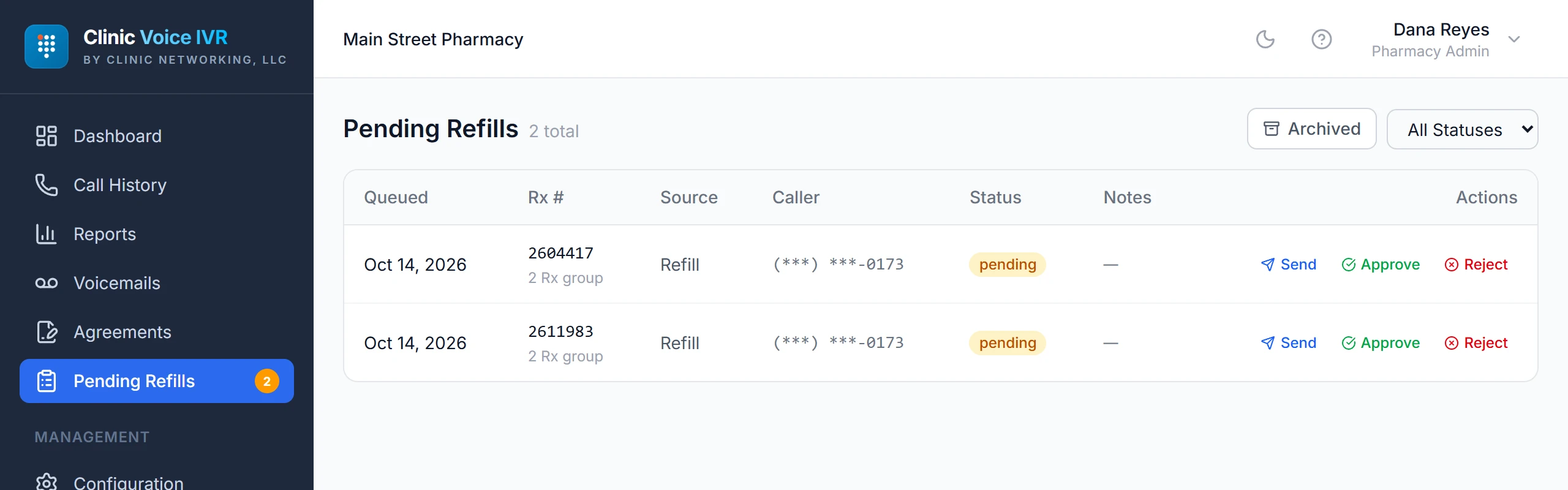
Requests taken while your system was down also appear in your Pending Refills queue, with the caller’s message attached, so your team can see exactly what came in.
Your team runs it from the portal
Reword a greeting, change your hours, or add a technician yourself, whenever you like. Everything here is in the portal, and none of it needs a call to us.
- Pending refills. Requests captured while your system was unreachable, with the caller’s voicemail attached. Send, approve, or reject each one with a note.
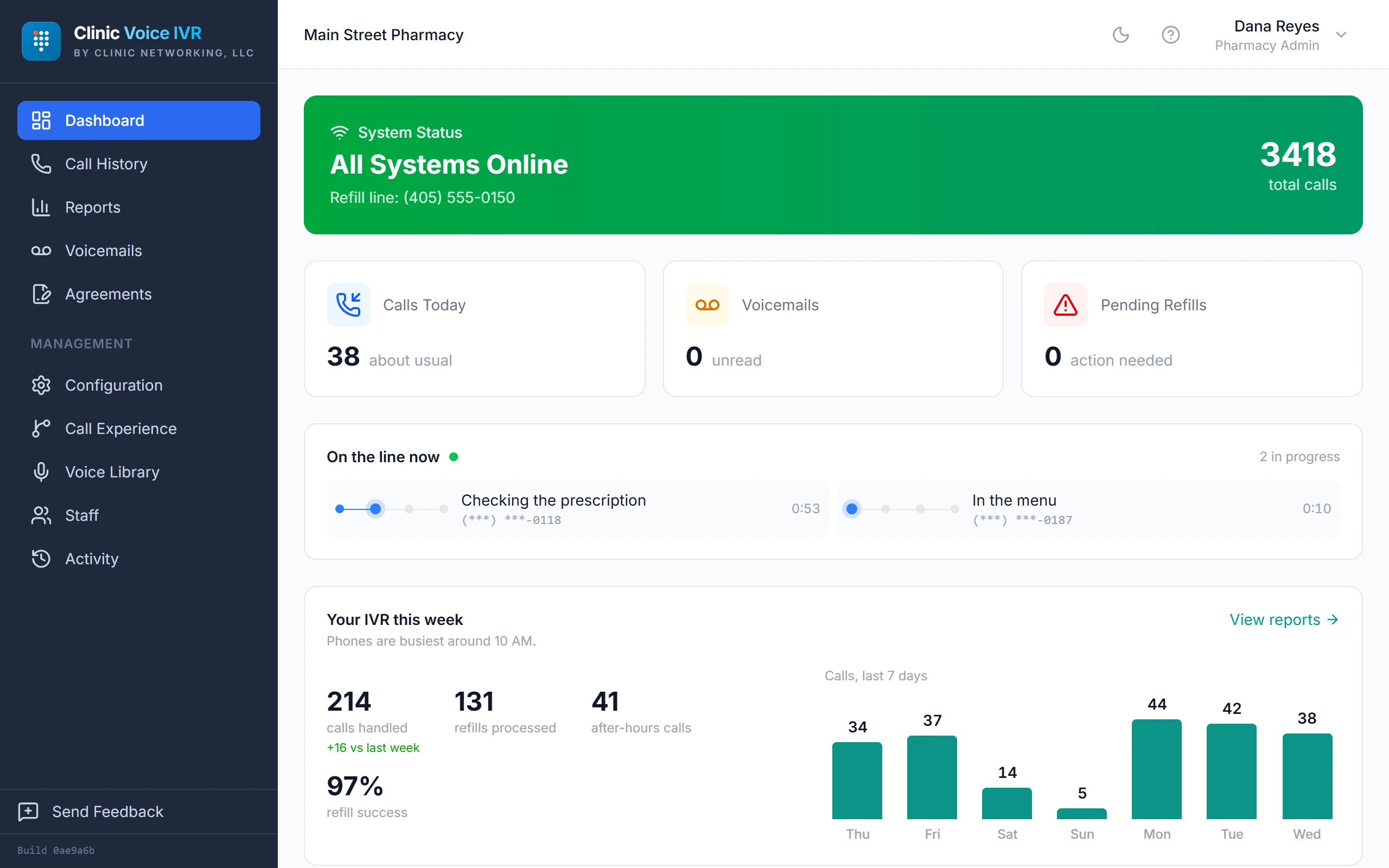
- Call history. The last 500 calls, each with a timeline of what was entered, what was looked up, whether verification passed, and what came back.
- Voicemail. Play in the browser, download, archive, or delete. Only your people can play them.
- Reports. Call volume against the previous period, refill success rate, average call length, after-hours share, voicemails received.
- Call experience editor. Your menu, prompts, hours, verification method, and pickup options, all editable and saved as you go.
- Voice library. Reword any of the 93 prompts or replace one with your own recording. Eight synthesized voices and eight studio-recorded ones to choose from.
- Business hours. Open and close times per day, recurring US holidays, and one-off closures. The line and your reports follow the same schedule.
- Daily digest email. Yesterday in one email, with a needs-attention section for voicemails and refills that have been waiting. Daily, weekly, monthly, or off, per person.
- Staff accounts. Add technicians, set roles, reset a password or someone’s MFA, and remove access, all on your own.
- More than one store. Managers over several locations get a combined view, a per-store scorecard, and a needs-attention list across all of them.
Built to hold up when someone asks how it works
Patient privacy is built into how the line works, and every item here is enforced on our servers, not promised in a policy.
- We store the minimum about each patient. A call record holds a masked phone number, the prescription number, and what happened. Patient names, dates of birth, and medication names are never stored.
- Only the last four digits of a caller’s number are kept. The full number is never written down, on purpose. We keep only what the line needs to do its job.
- Voicemail is encrypted with a key unique to your store. Each pharmacy’s recordings are encrypted with their own key, so one store’s voicemail can’t be opened with another’s.
- Our own staff can’t play patient voicemail. Playback is limited to your accounts. Clinic Networking accounts are blocked on the server, and any attempt is written to your audit log.
- You choose how callers prove who they are. Date of birth is the default. Lighter options, like matching on caller ID alone, need a signed authorization on file before they can be turned on.
- Sensitive changes need a second step. Changing your transfer number, your menu, or your verification method takes a passkey or an authenticator code, whatever the person’s role.
- Guessing is cut off. Repeated verification attempts on the same prescription are blocked after ten in an hour, even across separate calls.
- Your managers can audit their own team. An Activity page records every voicemail played or downloaded, every configuration change, and every staff-account change, filterable by person and date. It also shows every time a Clinic Networking account touched your store.
Built in from the start. We review our own platform on a regular cycle and fix what those reviews turn up before we write about it. Everything listed here is running today.
We sign a Business Associate Agreement covering the refill line with every pharmacy before it goes live.
One flat price
per pharmacy location
No setup fee. No per-call charges. No contract. The refill lines built for chains run two to four times this.
Book a demoWhat the $99 covers
- Your refill line, answered around the clock
- LibertyRx, Computer-Rx, or PioneerRx connection
- The RxConnector app and its updates, where needed
- The portal, with accounts for your whole team
- Editable prompts, menu, hours, and pickup options
- Eight caller languages besides English, recorded and ready
- Pending-refill queue, reports, and digest emails
- Support from the people who built it
Premium studio-recorded voices are an optional paid add-on, priced in the portal. Everything else listed here is included.
Questions pharmacies ask us
Do I have to change phone providers?
No. We assign you a refill line and you forward your existing refill number to it. Your phone system, carrier, and handsets stay exactly as they are. If you’d rather move the number to us, we can port it, which takes a few business days with the carrier. And if you move your phones to Clinic Voice, a menu option on your main number can send callers straight to the refill line.
Do we need VoIP, or new phones?
No. Call forwarding is the only thing your line has to do, and every carrier offers it, plain copper lines and the phones you’ve had for years included. Because the menu lives on our side, an older phone system gets a proper menu in the bargain: press 1 for refills, 2 to leave a message, 0 for the counter, without replacing a single handset.
How fast can we go live?
Usually the same day. Forwarding a number is instant, and setup plus a test call is the rest of it. Stores on Computer-Rx or PioneerRx also install the RxConnector app on one PC, which takes a few minutes. Porting a number instead of forwarding it is the one step that runs on the carrier’s schedule.
Is this artificial intelligence? Does it understand speech?
No, and that’s on purpose. It’s a keypad system. Callers press digits and the line follows a defined path you can read end to end in your portal. The same input always produces the same call.
What happens if my pharmacy system goes down?
The line tells the caller, takes their prescription numbers anyway, and offers to take a message. Each request lands in a Pending Refills queue in your portal, and once the connection returns they’re submitted on their own. If a request has been waiting more than an hour, your team is told.
Which pharmacy systems do you work with?
LibertyRx, through a direct cloud connection with nothing to install, and Computer-Rx (WinRx) and PioneerRx through RxConnector, a small app that runs on one store PC. Run something else? Tell us which, and we’ll give you a straight answer.
What does it cost?
$99 a month per location, flat. No setup fee, no per-call charge, no contract. That covers the line, the portal, your staff accounts, and support. Premium studio-recorded voices are the one paid add-on, and the portal shows the price before you turn one on.
What languages can callers use?
Spanish, French, German, Portuguese, Japanese, Korean, Chinese, and Arabic, alongside English, are recorded and ready. The whole call runs in the language the caller picks: prompts, verification, prescription status, pickup options, and the closing summary. You can offer up to eight alongside English. Need another? Ask, and we’ll look at adding it.
Do callers ever get stuck in the menu?
No. Pressing 0 transfers to your counter from any menu. After hours, a caller asking for a person hears you’re closed and is offered voicemail.
Do you record calls?
No. The only audio we keep is a voicemail the caller chooses to leave. Everything else is logged as events, such as which prompt played, which status came back, and which action was taken, with the caller’s number masked before it’s stored.
We have more than one store. How does that work?
Each location is its own line at $99 a month, with its own hours, prompts, and pharmacy-system connection. A manager assigned to several stores gets a combined view across all of them plus a per-store breakdown, from one login.
Hear it before you buy it
Call us and we’ll walk you through a real call on a demo store set up like yours.