
Keeps your important programs running
Some things just can’t go down
The pharmacies we look after run a system with anywhere from three to a dozen programs that all have to be up, or labels don’t print and claims don’t go through. When the server reboots at 2 am, none of them come back on their own, and the first person in finds out. Concierge starts them in the right order at boot, restarts whatever crashes, watches the services and printers underneath, and tells you when a person is needed. Built for pharmacies, and any Windows program you drag in gets the same treatment.
Version 0.10.0 · Windows 10 & 11 (64-bit) · No admin rights needed

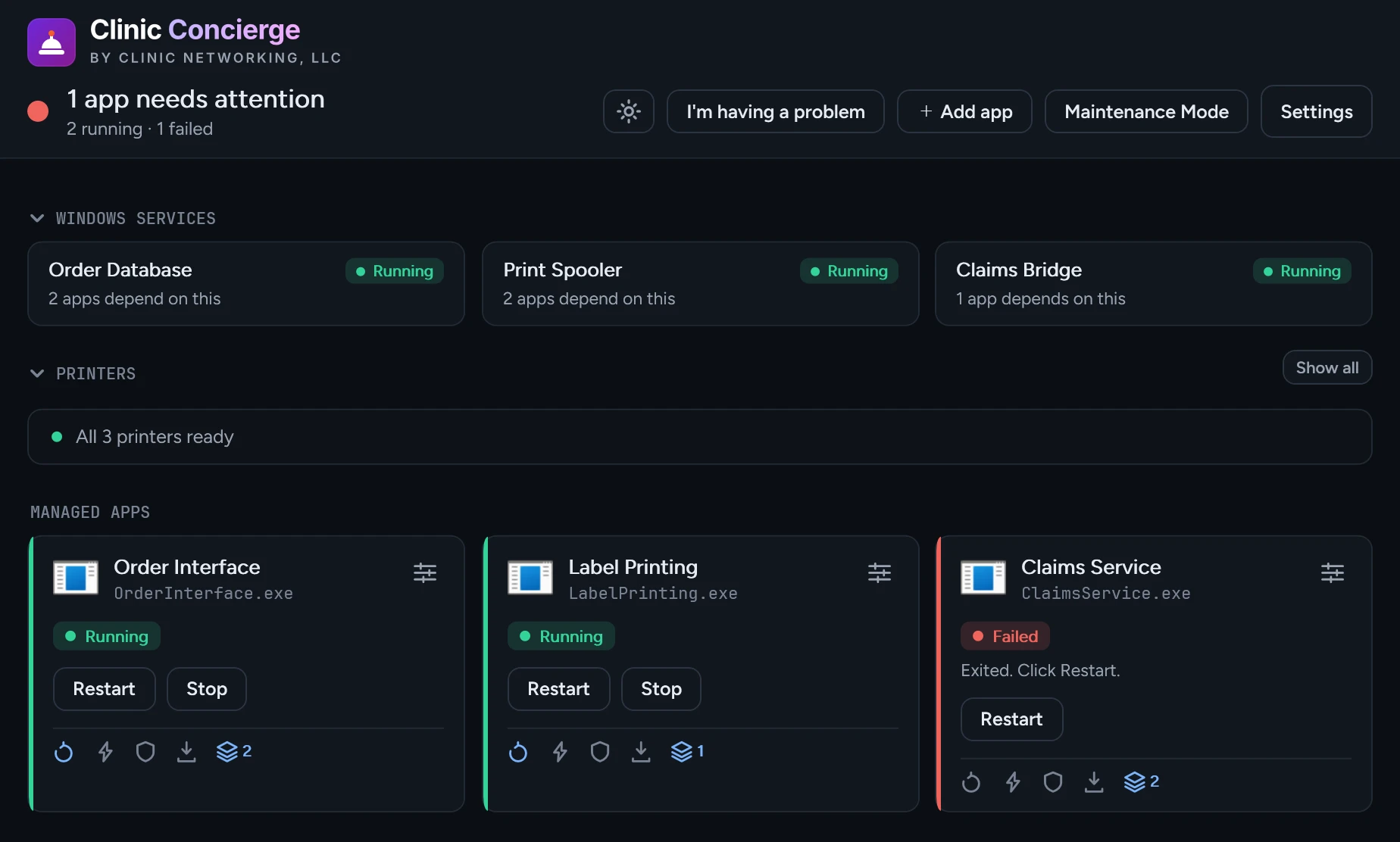
What Clinic Concierge does
Starts things in the right order
Your database engine has to be up before the programs that use it. Concierge waits for that, then starts everything a few seconds apart so the server isn't hit all at once.
Restarts what crashes
A program crashes, Concierge starts it back up. A program that keeps crashing gets a longer wait between tries, and after five tries in a few minutes Concierge flags the program for you instead of restarting all night.
Tells you when it needs you
When Concierge gives up on a program, or one you start by hand closes, you get a Windows notification. Add your email address and the same alert goes there too. The tray icon changes color either way.
Watches your printers
Printers cause more calls than anything else we deal with. Concierge checks the ones on that PC and tells you which are offline, jammed, out of paper, or not answering.
Start with one thing
You don’t have to hand Concierge your whole machine. Most people start with the one program that keeps causing trouble and add more later.
Just one program
Drag the shortcut onto the window. That’s the setup. From then on, if the program closes, Concierge opens it back up and lets you know.
Just a weekly reboot
Plenty of people use Concierge for this alone. Pick Sunday at 2 am and forget about it. Nothing else to set up.
Or the whole machine
Twenty programs, the services under them, every printer, and a maintenance schedule. Same app, and the screen stays easy to read as you add to it.
Everything in one place
A machine doesn’t break in one spot. Sometimes the program died, sometimes the service under the program did, sometimes a printer went offline three days ago and nobody noticed. Concierge shows all of that on one screen in the same colors, so your staff see red and either hit restart or call you.
Your programs
Whatever has to be running. Concierge picks up anything that's already open instead of starting a second copy, launches the rest once they're clear to go, and restarts them if they crash. Prefer to start something yourself? Say so, and Concierge simply lets you know when the program closes.
Windows services
The services your programs sit on top of, database engines included. Concierge reads their status to know when it's safe to start things, and shows you how many programs are waiting on each one. Starting and stopping them stays in your hands.
Printers
Every real printer on the machine, rechecked every couple of minutes. Offline, jammed, out of paper, or installed but not answering at its address, which is the one that looks fine until somebody tries to print. On Computer-Rx, the Label Print ports are read too, and you're told when one points at a printer that's no longer there.
Routines
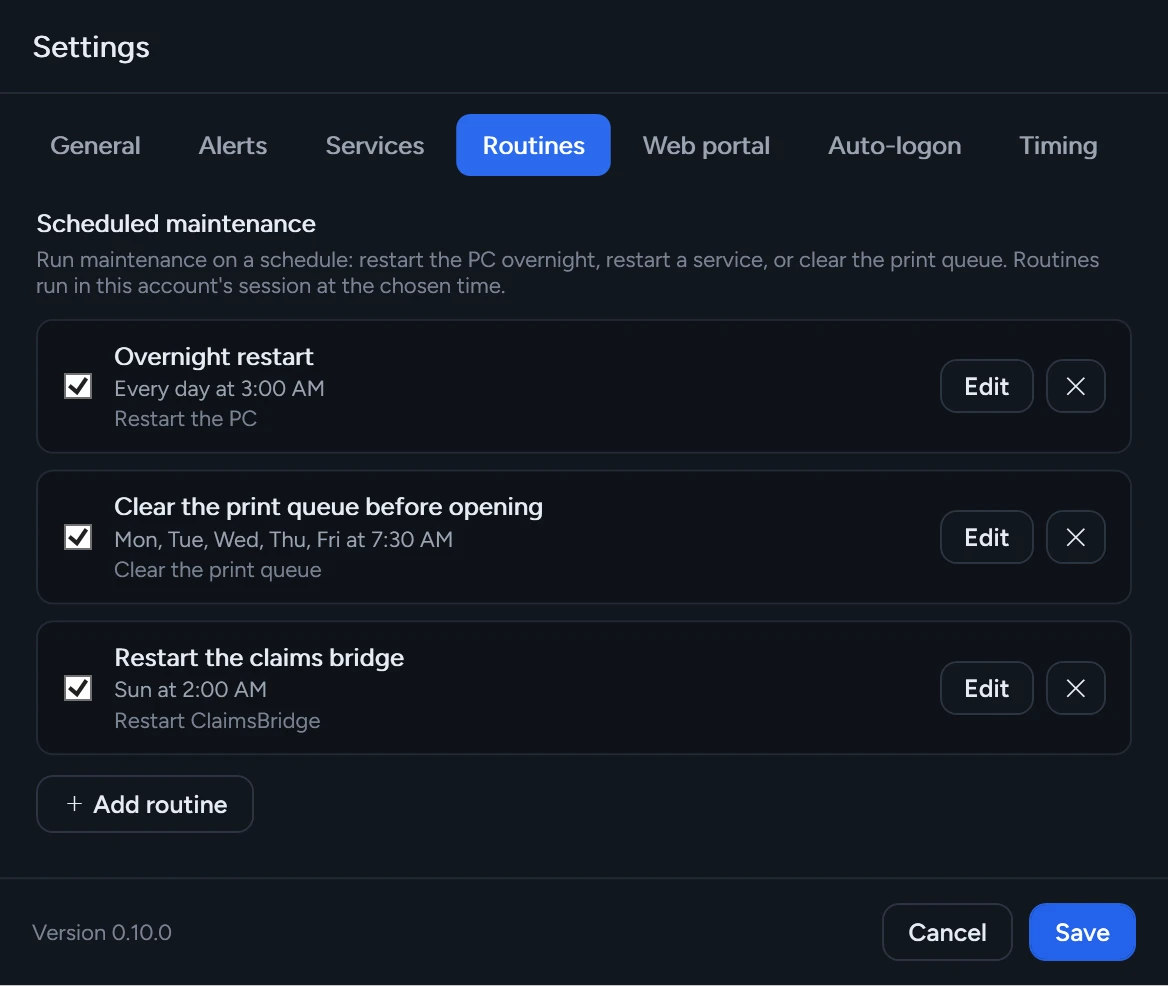
The overnight housekeeping that keeps a Windows machine healthy. Pick a time and the days, and leave it alone.
- Restart or shut down the computer
- Restart a Windows service
- Clear a stuck print queue
- Any of those together, in whatever order you want
Routines are set up as Windows scheduled tasks, so they run even when Concierge is closed. The ones that touch a service or a print queue ask for approval once, when you save them.
Check it from your phone
Concierge can put a small status page on your own network. Pull it up on your phone or the front counter PC to see what’s running, and restart something without walking back there.
- Off until you turn it on
- Protected by a password you set
- Stays on that one machine unless you open it up
- Restarts the programs Concierge already manages, and nothing more
When you need it to stand down
Installing an update, moving a server, working on the machine itself: times when something that keeps relaunching your programs is the last thing you want. Turn on Maintenance Mode and Concierge stops everything and leaves it stopped, through crashes, schedules, and updates alike.
While Maintenance Mode is on, the dashboard says so across the whole window, so you can’t forget. Turning it on asks for a confirmation, and points you to a single program’s Stop button if that’s all you needed.
Clinic Concierge for Windows
Version 0.10.0 · Windows 10 & 11 (64-bit)
Download installer
Included when we manage your systems, set up around what you actually run. Give us a call otherwise.
By installing, you agree to the End User License Agreement.
Signed and published by Clinic Networking
Concierge is code-signed, so the installer and any prompt it shows list Clinic Networking, LLC as the publisher. Updates are signed the same way and checked before they install.
Runs on
- Windows 10 (64-bit)
- Windows 11 (64-bit)
To install it
- No admin rights needed
- Installs for whoever is signed in
- Adds the .NET 8 Desktop Runtime if it is missing
Questions we get asked
Do we need an administrator to install it?
No. Concierge installs for whoever is signed in and doesn't ask for admin rights, so whoever's at the machine can install it. A couple of optional pieces, like a scheduled routine that restarts a service or clears a print queue, ask for approval once when you turn them on, with a normal Windows prompt that shows our name.
Is this only for pharmacies?
No. We built Concierge for our own clients, and most of them are pharmacies, but nothing in the app is pharmacy-only. Any Windows machine running something that has to stay up is a fit. Drag the shortcut in, say what to wait for, and you're done.
Will Windows warn us about the installer?
No. Concierge is code-signed, so you'll see Clinic Networking, LLC as the publisher. Updates are signed the same way and checked before they install.
What if a program just won't stay up?
Concierge keeps trying, waiting a bit longer each time. After five restarts in three minutes, Concierge stops, marks the program Failed, turns the tile red, and sends you an alert. Something crashing every twenty seconds needs a person, and that's the moment you hear about it.
Can we check on it without walking back there?
Yes. Turn on the built-in web page and Concierge serves a small status page you can open on your phone or the front counter PC, with a restart button for anything Concierge manages. The page is off until you switch it on, protected by a password you set, and stays on that one machine unless you choose to open it to your network.
Does it send our data anywhere?
No. Concierge runs on your machine and reads your machine. The only things reached for outside are updates and a list of recommended settings for programs Concierge recognizes. Email alerts go to the mail server and addresses you enter, and nowhere else. Nothing about your business leaves the machine.
How does it update?
On its own. Shortly after starting, and every six hours after that, Concierge checks for a new signed build and installs it quietly. You can turn that off in Settings if you'd rather install updates yourself.
What does it cost?
Included when we manage your systems, set up around whatever that site runs. If we don't manage you and you'd like Concierge anyway, give us a call and we'll work something out.
We’ll get it set up with you
Setting Concierge up right means knowing which programs matter to you, what has to start before what, and which ones should wait for a person before restarting. That’s a five-minute phone call, and it comes with managed support. And if there’s something you need watched that Concierge doesn’t handle yet, ask. That’s how most of what’s in the app got there.
Already a client? support@clinicnetworking.com